

Best AI tools for YouTube automation aren’t just a trend — they’re quietly changing how serious creators run their channels. If you’ve ever spent six hours editing a video, writing a description, designing a thumbnail, and scheduling everything manually, you already know the pain. The good news is that a handful of tools have gotten genuinely good at handling all of this, or at least most of it.
This isn’t a list of every tool that mentions “AI” somewhere on its website. It’s a practical breakdown of what works, what’s overhyped, and what Indian creators and global YouTubers are actually using in 2026.
Why YouTube Automation Matters for Creators in 2026
Let’s be honest — most creators don’t quit YouTube because they run out of ideas. They quit because the workflow is exhausting. Scripting, recording, editing, thumbnails, SEO, scheduling, community management — it compounds fast.
That’s where the best AI tools for YouTube automation step in. They don’t replace creativity. They handle the repetitive layer underneath it, so you can focus on the part that actually keeps viewers coming back.
The Indian creator economy in particular has grown sharply — cities like Bangalore, Hyderabad, Pune, and Mumbai now have thousands of full-time YouTubers. The competition for views is real, and those who automate smart have a clear edge.
Best AI Tools for YouTube Automation You Should Know
1. Script-to-Video Tools — Turn Written Content Into Watchable Video
Primary Pick: Pictory
Pictory is one of the more genuinely useful tools if your content style lends itself to voiceover-driven videos. You paste in a blog post or script, and it pulls relevant stock footage, adds captions, and creates a shareable video — fast.
It’s not magic. You’ll still need to tweak things. But if you run a faceless YouTube channel on topics like finance, tech news, or travel, Pictory cuts your production time significantly.
Best for: Faceless channels, repurposing blog content into video.
Alternatives Worth Trying
InVideo AI is probably Pictory’s closest competitor right now, and honestly, for some use cases it’s better. The interface is cleaner, the stock footage library is larger, and the AI script-to-video pipeline handles topic prompts well — meaning you don’t even need a finished script to start. You type a topic, it builds a video outline and matches footage automatically. The free tier is more generous than Pictory’s.
Synthesia takes a different approach. Instead of stock footage, it uses AI avatars — digital presenters that read your script on camera. It’s surprisingly convincing for corporate-style content or educational channels. Not the right fit for lifestyle or entertainment, but for tutorial-heavy niches it works well. Pricing is on the higher side, though.
Steve.AI is a lesser-known option that converts blog posts and scripts into animated or live-action videos. If your channel uses a lot of explainer-style animation, it’s worth a look. Cheaper than Synthesia and easier to use than After Effects templates.
2. YouTube SEO Tools — Research and Metadata Optimization
Primary Pick: VidIQ
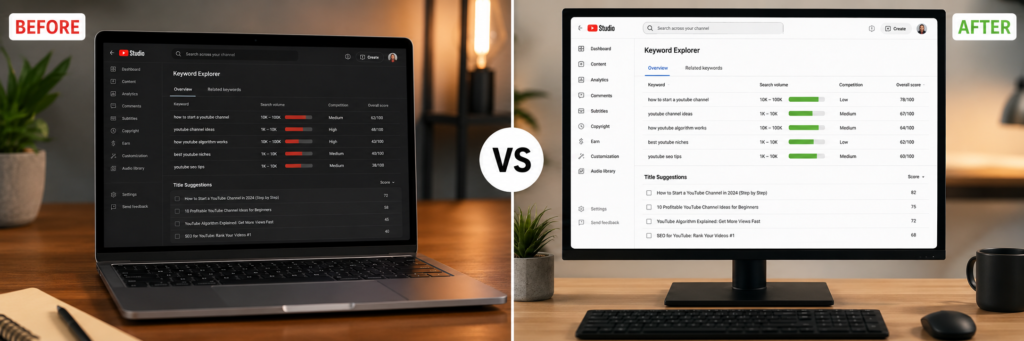
VidIQ is probably already on your radar, but it’s worth including because the AI features have improved a lot. The keyword research tool now gives you search volume estimates, competition scores, and related keyword suggestions directly in your dashboard.
The “Daily Ideas” feature is hit or miss, but the SEO scoring for your video metadata is solid. For creators targeting Indian audiences searching in English or Hinglish, the regional keyword data has gotten more reliable.
Best for: Keyword research, competitor analysis, title optimization.
Alternatives Worth Trying
TubeBuddy is the other half of this conversation. If you ask most experienced YouTubers which they prefer — VidIQ or TubeBuddy — you’ll get an even split. TubeBuddy’s A/B thumbnail testing feature is something VidIQ doesn’t offer, and if you’re serious about optimizing click-through rates, that alone might tip the decision. Their tag explorer and bulk editing tools are also genuinely useful for managing large libraries of older videos.
Morningfame is the underdog here and doesn’t get nearly enough attention. It’s built specifically for smaller channels trying to grow, and it gives you a “channel score” that helps you understand whether a topic is realistic to rank for given your current authority. Less overwhelming than VidIQ, more focused on actionable decisions.
ChatGPT or Claude — yes, large language models count as SEO tools at this point. Feeding a competitor’s top video title into a prompt and asking for 10 keyword variations gets you a useful working list fast. It’s not a replacement for real search data, but for generating title options or refining descriptions, it saves time.
3. Video Editing Tools — Cut, Clean, and Finalize Faster
Primary Pick: Descript
Descript is the one tool I’d call actually impressive rather than just convenient. You upload your video, it transcribes it, and then you edit by deleting words from the transcript. The video cuts follow automatically.
The “Remove Filler Words” feature is the real time-saver here — it strips out every “um,” “uh,” and “you know” in one click. For creators who talk a lot on camera and hate editing pauses, this alone is worth the subscription.
Best for: Talking-head videos, podcast-style content, solo creators.
Alternatives Worth Trying
Opus Clip does something Descript doesn’t: it takes your long-form video and automatically identifies the most engaging moments, then cuts them into short clips formatted for YouTube Shorts, Reels, or TikTok. The AI scoring for “virality potential” is debatable, but the actual clipping and reformatting work is solid. If you’re trying to repurpose long videos into short content without spending an hour doing it manually, Opus Clip is the fastest option available right now.
Runway ML is more advanced — it’s built for creators who want generative AI in their editing workflow. You can remove objects from footage, generate B-roll from a text prompt, or apply cinematic effects that would normally require After Effects. It has a steeper learning curve than Descript, but the output ceiling is higher. Good fit for creators who want more visual production quality without hiring an editor.
CapCut deserves a mention for its auto-caption, auto-cut, and AI background removal features. It’s free, which matters. The mobile version is genuinely capable, and many Indian creators use it as their primary editing tool for Shorts. Not as powerful as Descript for long-form, but for quick turnaround content it’s hard to beat at zero cost.
4. Thumbnail Creation Tools — Design That Gets the Click
Primary Pick: Canva Magic Studio
Canva’s AI suite, now called Magic Studio, lets you generate background images, remove backgrounds, resize layouts, and write text variations quickly. The templates built for YouTube thumbnails are sized and formatted correctly, which sounds obvious but saves time.
Best for: Thumbnail design, channel art, shorts graphics.
Alternatives Worth Trying
Adobe Firefly (integrated into Adobe Express) is worth considering if you want AI-generated images that actually look polished rather than stock-photo generic. You can generate a custom background image from a text prompt, drop your face into it, add bold text, and export a thumbnail in minutes. The image quality is a step above what Canva’s AI generator produces, though the interface takes getting used to.
Thumbnail.ai is a focused tool that does one thing: generates YouTube thumbnail concepts based on your video title. You type the title, it spits out several layout options. Not a full design tool, but useful as a starting point when you’re stuck on direction. Good for creators who know how to use Canva or Photoshop but blank out on composition ideas.
Midjourney is overkill for most creators, but if you run a channel where visual identity is central — cinematic content, fantasy, sci-fi, or highly stylized commentary — having access to high-quality AI image generation for thumbnails is a real advantage. Requires a Discord account and some prompt writing skill, but the results at higher tier settings are noticeably better than built-in Canva AI images.
5. AI Voiceover Tools — Audio Without the Recording Setup
Primary Pick: ElevenLabs
ElevenLabs has become the go-to for faceless channel operators who want voiceovers that don’t sound robotic. You type a script, choose a voice, and it generates audio that passes a casual listen test. The Indian English voices have improved, which matters if your audience is based in India.
Best for: Faceless YouTube channels, dubbed content, multilingual videos.
Alternatives Worth Trying
Murf AI is the most direct competitor to ElevenLabs and has a stronger library of Indian English voices specifically. If you’re creating content for a Hindi-speaking audience but want English narration that sounds natural to that demographic, Murf’s voice options are more varied. It also has a built-in studio where you can sync voiceover directly to slides or video timelines.
Play.ht offers voice cloning at a lower price point than ElevenLabs’ top tier. You can upload a sample of your own voice and generate new narration in your voice without recording. Useful if you want to maintain your voice identity on the channel but record in bulk without sitting at a mic every day.
Speechify is better known as a text-to-speech reader, but its Studio feature has quietly become a solid voiceover tool for YouTube. The natural-sounding voices work well for shorter scripts, and the speed controls let you push narration slightly faster than natural speech — which many creators prefer for retention on educational content.
Best AI Tools for YouTube Automation: A Practical Workflow
Here’s how these tools fit together in a real production pipeline:
- Use ChatGPT or Claude to draft the video script from a keyword
- Run the script through ElevenLabs or Murf AI for voiceover
- Drop the audio into Pictory or InVideo AI to add visuals
- Export, then clean up in Descript or CapCut
- Cut short clips from the final video using Opus Clip
- Design the thumbnail in Canva Magic Studio or Adobe Firefly
- Use VidIQ or TubeBuddy to finalize metadata before upload
From script to upload, this pipeline can take under two hours for a standard 8–10 minute video. That’s a real change from what used to take a full working day.
Are These Tools Worth the Cost?
Most of these tools run between ₹800 and ₹4,500 per month depending on the plan. The temptation is to subscribe to all of them at once. Don’t. Pick the one that fixes your biggest bottleneck right now — whether that’s editing time, thumbnail speed, or SEO research — and add tools only when you’ve actually used the first one properly.
The creators getting real value from the best AI tools for YouTube automation aren’t using more tools. They’re using fewer tools, more consistently.
If budget is a concern early on, start with our guide to free AI tools for beginners instead of jumping straight to paid software.
Final Thoughts
None of these tools will build an audience for you. But if you’re already creating content worth watching and spending too many hours on production logistics, the tools above are worth testing seriously. Start with the section that matches your current bottleneck, try the primary pick first, and keep the alternatives in your back pocket for when your needs evolve.
FAQs
1. What is YouTube automation?
Best AI Tools for YouTube Automation means using systems, tools, or outsourcing to manage content creation tasks efficiently.
2. Is YouTube automation legal?
Yes, YouTube automation is completely legal as long as you follow YouTube policies and avoid spam or copyright violations.
3. Can AI create complete YouTube videos?
Yes. Modern AI tools can help with scripts, voiceovers, editing, thumbnails, and publishing.
4. Which AI tool is best for faceless YouTube channels?
ChatGPT, ElevenLabs, and Pictory are among the best choices for faceless channels.
5. Is YouTube automation profitable?
Yes. Many creators earn through ads, sponsorships, and affiliate marketing using automated channels.


Pingback: How to Make AI Videos for Free in 2026