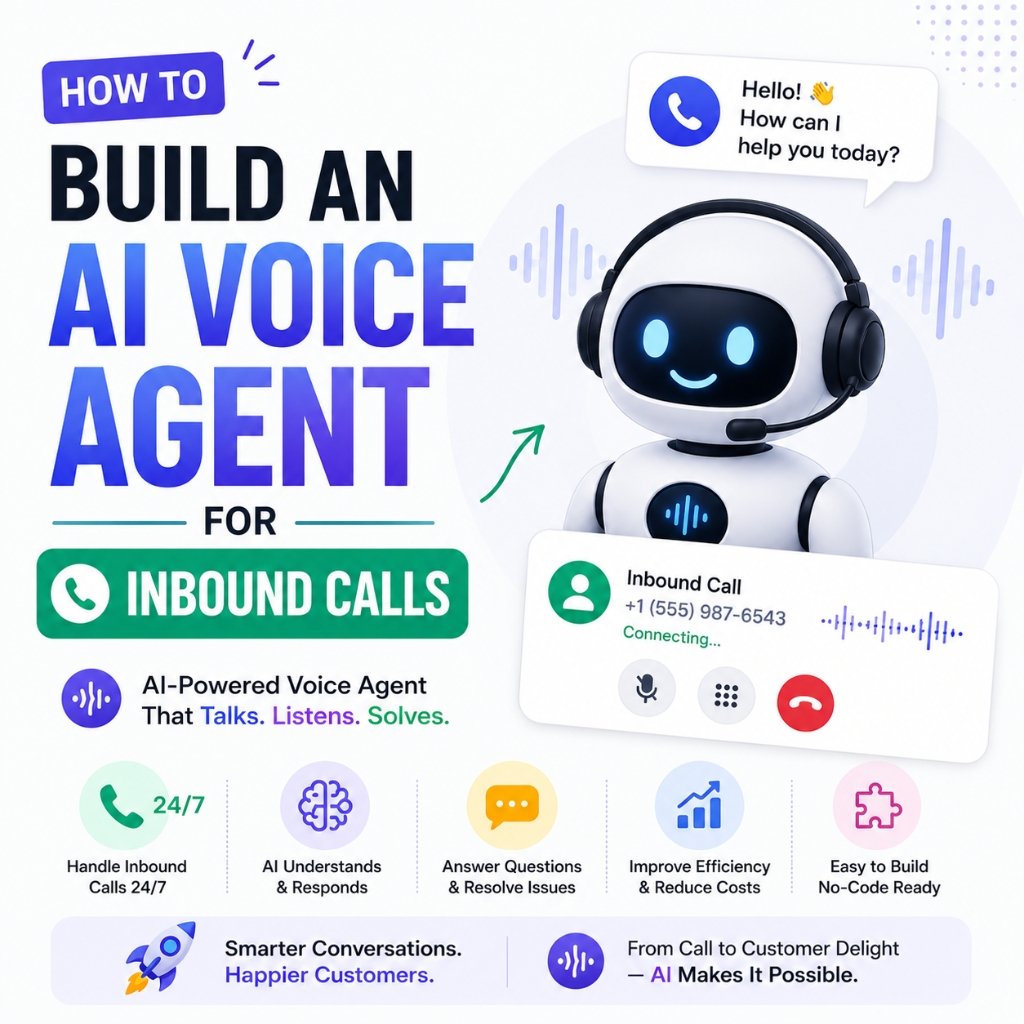

Learning how to build ai voice agent for inbound calls has quickly become one of the most profitable and high-impact automation capabilities for modern businesses in 2026. For decades, companies relied on rigid Interactive Voice Response (IVR) phone menus—the frustrating “Press 1 for Sales, Press 2 for Support” systems that lead customers through endless loops of automated recordings. When customers finally reach a voicemail box or experience long hold times, over 60% hang up and call a competitor instead.
Today, real-time generative voice technology has eliminated robotic phone trees. Modern voice AI models can answer customer phone calls in natural, conversational human voices with sub-second response times (under 500ms), understand complex multi-sentence questions, look up real-time database records, and book appointments directly into Google Calendar.
Why You Should Build AI Voice Agent for Inbound Calls
Small and medium-sized businesses lose thousands of dollars every month simply because staff members are busy helping in-person clients when the phone rings. A dental clinic, law firm, auto repair shop, or real estate brokerage cannot afford full-time night and weekend receptionists to answer after-hours inquiries.
When you build ai voice agent for inbound calls, you eliminate missed-call revenue leaks by providing instant, human-like voice assistance around the clock without inflating front-desk payroll.
Key benefits of deploying an AI voice agent include:
- Zero Missed Inbound Calls: Every customer receives an instant, friendly greeting on the first ring, 24 hours a day, 365 days a year.
- Autonomous Task Execution: The voice agent does not just speak; it executes actions like checking appointment availability, collecting caller details, and sending confirmation SMS messages.
- Seamless Multilingual Pacing: Voice agents can effortlessly detect caller accents and switch languages (e.g., English, Hindi, Spanish, or Kannada) smoothly during the conversation.
The Core Architecture to Build AI Voice Agent for Inbound Calls
To successfully build ai voice agent for inbound calls, your system connects three ultra-low-latency processing layers:
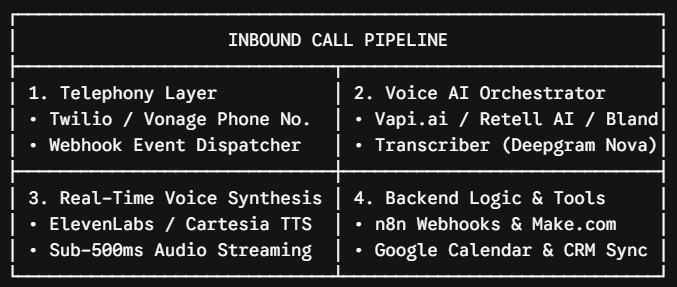
Telephony Provider (Twilio or SIP Trunking): Provides the local or toll-free phone number and handles incoming voice audio streams.
Voice AI Orchestrator (Vapi.ai, Retell AI, or Bland AI): Coordinates the speech pipeline, manages interruption handling, and maintains conversational flow.
Speech-to-Text (STT) & Text-to-Speech (TTS): Uses ultra-fast transcription models (like Deepgram Nova-2) and natural voice engines (like ElevenLabs or Cartesia).
Reasoning Core & Function Calling (LLM + n8n): Powered by GPT-4o or Claude 3.5 Sonnet to determine answers, grounded by n8n workflows that query your company database.
Step-by-Step Guide to Build AI Voice Agent for Inbound Calls
Follow this five-step blueprint to configure and launch your AI phone assistant:
Step 1: Configure Your Phone Number in Twilio & Connect to Vapi
- Create a free account on Twilio and purchase a local phone number with voice capabilities.
- Sign up on Vapi.ai (or Retell AI). In the Vapi dashboard, navigate to Phone Numbers and import your Twilio credentials (Account SID and Auth Token).
- Assign the imported number to a new assistant profile.
Step 2: Configure Voice Persona, Latency & System Guardrails
In the assistant configuration tab, select your models and set your conversational parameters:
- Transcriber:
Deepgram Nova-2(Optimized for fast phone audio recognition). - Voice Provider:
ElevenLabs Turbo v2.5orCartesia Sonic(Select a warm, professional voice profile). - System Prompt Template:
You are "Sarah", the virtual receptionist for [Business Name].
Your goal is to warmly greet callers, answer questions about our business hours and services, and help them schedule appointments.

RULES:
1. Speak concisely in natural, spoken conversational English. Keep answers under 2 sentences.
2. Never read long bulleted lists over the phone.
3. If a caller wants to book a consultation, ask for their Name, Phone Number, and Preferred Time, then trigger the "bookAppointment" tool.
4. If a caller asks for an urgent human representative, trigger the "transferCall" tool.
Step 3: Connect Function Calling & n8n for Calendar Booking
A vital step to build ai voice agent for inbound calls that actually solve problems is giving the agent calendar booking and CRM lookup tools.
- In Vapi, add a Custom Function / Tool called
checkAvailability:- Parameters:
date(string),time(string). - Server URL: Paste your n8n Webhook URL.
- Parameters:
- In n8n, create a workflow starting with the Webhook node, connect a Google Calendar node to search free/busy slots, and return a clean JSON response back to Vapi.
- When the caller asks, “Do you have any openings this Thursday afternoon?”, the voice agent queries your calendar in real time and answers naturally.
Step 4: Configure Live Call Transfers & SMS Confirmations
Ensure your agent includes human fallback routing:
- Configure a Forwarding Phone Number in Vapi. If the caller says “I need to speak to Dr. Smith immediately”, the voice agent gracefully says “Let me transfer you right away,” and bridges the live call to your office staff.
- Attach a post-call webhook in n8n that sends an instant SMS confirmation (via Twilio) to the caller with their appointment details and Google Maps directions.
Step 5: Test and Deploy
Call your Twilio number from your mobile phone. Test real-world scenarios: interrupt the bot mid-sentence, ask about pricing, book a sample appointment, and verify that the calendar entry and confirmation SMS trigger immediately.
High-Ticket Monetization: Packaging AI Voice Agents for Local Clients
Local marketing agencies now build ai voice agent for inbound calls as a premium $1,500 to $3,000 turnkey setup service for dental practices, auto repair shops, and law firms.
Because phone calls represent the highest-intent customer inquiries for local businesses, business owners instantly understand the value proposition:
| Package Tier | Scope of Deliverables | Setup Fee | Monthly Retainer |
| Starter Receptionist | 24/7 FAQ voice bot + after-hours call routing | $1,200 | $250 / month |
| Growth Automated Suite | Live Calendar Booking + SMS Confirmations + CRM Sync | $2,200 | $450 / month |
| Enterprise Multi-Location | Multi-branch routing + Bilingual Spanish/English + Custom RAG | $3,500+ | $750 / month |
Frequently Asked Questions to Build AI Voice Agent for Inbound Calls
Q: Is the latency low enough to build ai voice agent for inbound calls that sounds natural?
Yes. By pairing fast speech-to-text engines (Deepgram Nova-2) with streaming text-to-speech models (Cartesia Sonic or ElevenLabs Flash), modern voice agents achieve end-to-end response latencies under 400 to 600 milliseconds, matching natural human conversation rhythm.
Q: Can the AI voice agent handle caller interruptions?
Yes. Modern voice platforms have built-in turn-taking and interruption detection. If a caller begins speaking while the AI is talking, the agent immediately stops speaking, listens to the new input, and adapts its response.
Q: How much does it cost to run an AI phone agent per minute?
The combined operational cost across telephony (Twilio), speech transcription, LLM tokens, and voice synthesis typically averages $0.07 to $0.12 per minute of active phone conversation, making it over 90% cheaper than traditional call-center answering services.
Conclusion & Action Steps
AI voice agents are transforming business phone communication from a stressful operational bottleneck into an automated revenue engine. By combining Twilio, Vapi.ai, and n8n, you can deploy intelligent, human-sounding virtual receptionists that delight callers and capture every inbound opportunity.
Set up your Twilio and Vapi accounts today, test this prompt blueprint on your own phone number, and deploy your first voice assistant. For more downloadable voice agent templates, prompt recipes, and no-code automation tutorials, visit aiguruji.tech.
Looking to automate more than just inbound calls? You can also build a WhatsApp AI chatbot with n8n to automate customer conversations, handle queries, and create powerful no-code workflows. Check out our step-by-step guide: Build WhatsApp AI Chatbot with n8n (No-Code Guide)